Creating a Custom 404 Page with Genesis – Tutorial
Genesis uses a very busy default 404 page. When I made the switch, I didn't want to lose my old custom 404 page, but couldn't figure out how to create a new one either.
But I wanted my custom 404 page damn it. So, I asked the Genesis team for some help to make it happen. Below is how it's done.
Getting the initial code
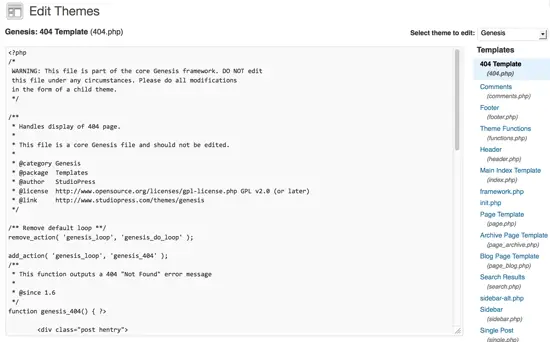
First, in the WP Dash go to Appearance > Editor and select the core Genesis framework (not your child theme, but actual “Genesis”) from the drop-down on the top right.
However, DO NOT DIRECTLY EDIT ANY CORE GENESIS FILES or they'll be overwritten with the next update.
Adding the 404.php template to your child theme
One you have the Genesis framework files open in the editor, choose the 404.php template and copy and paste all that's written within it to a NEW FILE on your computer using your favorite text editor. Save that file as 404.php and then upload it to the child theme folder that you're using via FTP.
Edit the 404.php template in your child theme
Then go back to the WP Dash and go to Appearance > Editor and select the child theme you're using. Click on the 404.php file in the right sidebar and edit away.
Say what?
Not sure what to edit? A Genesis default 404 shows the site pages, authors, archives, recent posts, and categories.
Page heading
<h1 class="entry-title"><?php _e( 'Not Found, Error 404', 'genesis' ); ?></h1>
The above code is what spits out the heading at the top of the page. It's where you see “Not Found, Error 404” at the top of the default 404 page. Change the “Not Found, Error 404” in the code to whatever you'd like to appear for the page heading (mine says “Sock it to me!”):
<h1 class="entry-title"><?php _e( 'Your Heading', 'genesis' ); ?></h1>
IMPORTANT: If you're going to use an apostrophe (AKA single quote) inside any PHP call (not a programmer, don't know a better word for it – or if there even is one) be SURE to add a forward slash in front of it. I.e. if you want your title to say “We Can't Find That Page” it would need to be:
<h1 class="entry-title"><?php _e( 'We Can\'t Find That Page', 'genesis' ); ?></h1>
Intro text
<?php printf( __( 'The page you are looking for no longer exists. Perhaps you can return back to the site\'s <a href="%s">homepage</a> and see if you can find what you are looking for. Or, you can try finding it with the information below.', 'genesis' ), home_url() ); ?>
The above is what generates paragraph under the heading at the top of the 404 page. Replace the intro text with whatever you'd like to change it to:
<?php printf( __( 'Add whatever intro text you want here. And put a link to your <a href="%s">homepage</a> if you want to.', 'genesis' ), home_url() ); ?>
Page content
Next you'll see a bunch of code inside two divs labeled “archive-page”. That's what makes the two columns that list the the site pages, authors, archives, recent posts and categories. The top <div class=”archive-page”> creates the left column which lists pages and categories:
<div class="archive-page">
<h4><?php _e( 'Pages:', 'genesis' ); ?></h4>
<ul>
<?php wp_list_pages( 'title_li=' ); ?>
</ul>
<h4><?php _e( 'Categories:', 'genesis' ); ?></h4>
<ul>
<?php wp_list_categories( 'sort_column=name&title_li=' ); ?>
</ul>
</div><!-- end .archive-page-->
The second one creates the right column which lists author pages, archives and recent posts:
<div class="archive-page">
<h4><?php _e( 'Authors:', 'genesis' ); ?></h4>
<ul>
<?php wp_list_authors( 'exclude_admin=0&optioncount=1' ); ?>
</ul>
<h4><?php _e( 'Monthly:', 'genesis' ); ?></h4>
<ul>
<?php wp_get_archives( 'type=monthly' ); ?>
</ul>
<h4><?php _e( 'Recent Posts:', 'genesis' ); ?></h4>
<ul>
<?php wp_get_archives( 'type=postbypost&limit=100' ); ?>
</ul>
</div><!-- end .archive-page-->
If you'd like to keep two columns below your intro text on your 404 page, simply edit what's inside each <div class=”archive-page”></div> to be what you want:
<div class="archive-page">
<p>Your left column content here.</p>
</div><!-- end .archive-page-->
<div class="archive-page">
<p>Your right column content here.</p>
</div>
What about changing the page content to be one column?
If you want to get rid of the columns all together, then simply remove both the left and right <div class=”archive-page”></div> in their entirety and simply add your 404 content via a new <p></p> tag right below the intro text <p></p>.
So this:
<div class="entry-content">

<?php printf( __( 'The page you are looking for no longer exists. Perhaps you can return back to the site\'s <a href="%s">homepage</a> and see if you can find what you are looking for. Or, you can try finding it with the information below.', 'genesis' ), home_url() ); ?>
<div class="archive-page">
<h4><?php _e( 'Pages:', 'genesis' ); ?></h4>
<ul>
<?php wp_list_pages( 'title_li=' ); ?>
</ul>
<h4><?php _e( 'Categories:', 'genesis' ); ?></h4>
<ul>
<?php wp_list_categories( 'sort_column=name&title_li=' ); ?>
</ul>
</div><!-- end .archive-page-->
<div class="archive-page">
<h4><?php _e( 'Authors:', 'genesis' ); ?></h4>
<ul>
<?php wp_list_authors( 'exclude_admin=0&optioncount=1' ); ?>
</ul>
<h4><?php _e( 'Monthly:', 'genesis' ); ?></h4>
<ul>
<?php wp_get_archives( 'type=monthly' ); ?>
</ul>
<h4><?php _e( 'Recent Posts:', 'genesis' ); ?></h4>
<ul>
<?php wp_get_archives( 'type=postbypost&limit=100' ); ?>
</ul>
</div><!-- end .archive-page-->
</div>
Would become this:
<div class="entry-content">

<?php printf( __( 'The page you are looking for no longer exists. Perhaps you can return back to the site\'s <a href="%s">homepage</a> and see if you can find what you are looking for. Or, you can try finding it with the information below.', 'genesis' ), home_url() ); ?>

<h4>Optional subtitle here</h4>

<p>Whatever you want to show after the intro</p>

</div><!-- end .entry-content-->
Or even merely this:
<div class="entry-content">

<h4>Optional subtitle here</h4>

<p>Whatever you want to show after the heading as content</p>

</div><!-- end .entry-content-->
Cheers!

22 Comments
Please note – I use affiliate links on this site. This means I might earn a commission if you click on a link and sign up for something.
Any other reason to change the genesis 404 page other than for design purposes?
Nope, not for me. The 404 isn’t indexed or anything… it’s purely for design, customization and usability purposes for me.
Hi Rae,
There is also a cool plugin that makes it easy to create a simple 404 page on Genesis sites:
http://wordpress.org/extend/plugins/genesis-404-page/
It was developed for Genesis and works very well.
Damian
Thanks for the tip!
Nice – thanks Damian! Wish I would have read the comments first – would have saved some time (but Rae’s instructions were easy to follow).
Any idea on a Genesis site you stop the widget area from showing up? Got everything how I want it but cannot stop an empty, widget area showing down the right hand side.
Jon – I need more details as far as what you mean to be able to answer that…
Here’s another way that doesn’t require duplicating the core 404 page:
http://www.carriedils.com/custom-404-wordpress-html-sitemap/1574
Also, with editing the files, the _e(‘Text’, genesis) code is used for translations, so you don’t need to keep that if you’re doing some custom stuff not for distribution. (e.g. could simply be We Can’t Find That Page.
Welcome to the Genesis family!
Alright, well, the HTML I included got stripped out of that last one. In the “Also, with editing” paragraph, I was just saying that in the above example re the h1 class=”entry-title”, you could just put the text in, replacing the entire block.
Thanks for that, Rae. Remarkably simple once you know how. Now I can indulge my penchant for awful Led Zeppelin puns (Page not found, arf arf arf) all I like.
Here’s a way to exclude pages from your 404 page template. http://www.studiopress.com/forums/topic/editing-the-404-error-page-in-fabric-theme/#post-38544
I would like to use my Genesis theme’s Landing Page for my custom 404 page. Does anyone know how I would do that please?
Marcus – not sure what you mean by “Genesis theme’s landing page” – can you clarify?
I would like to know too how to use the Genesis “Landing Page” as the page template for a 404 page. Rae – I think what Marcus is saying is when you create a new page, on the right side of the page there is a drop down under Page Attributes called Template. If you drop that down you’ll see Landing Page. This is blank page with all page elements (header, sidebars, footer etc) removed.
I’d like to use this as the basis of my 404 page and just add a header and image…
Can you help?
Thanks
David
Your tutorial is great – very easy to follow and understand. But the page I created is not displaying a custom sidebar menu. It is showing the “Primary Sidebar Widget Area.”
How do I make the 404 page display a custom sidebar menu?
Hi there, thanks for that, what do you recommend as the best ad management plug in? Currently migrating my site from .com to .org via genesis and wordpress, the child theme we bought suggests not using an ad management plug in but I think it would be very useful,
Thanks and kindest regards from Dubai,
Monica.
Thanks so much for the tutorial. You did a great job of presenting the kind of detailed, step by step instructions that people look for. I sorted through a lot of material that I found useless before finding this (most of what I found offered help help setting design elements but never helped with changing the content on the page!) so I am really grateful for it.
Very good instructions on how to customize the 404 page in Genesis – thank you!
I’m looking to change the sidebar on the 404.php page in my Studiopress child theme. Any clue on how to do this?
Yeah, the default 404 page is kinda… not too pretty ;). Dig the pink image on your site header and buttons btw.
Thanks!
Worked perfectly, thanks!